Timesheets
Timesheets records labour on the project — who worked, for how long, against which cost code, and at what rate. Approved hours feed the project's cost position, so the module sits between site records and Finance.
The Timesheet Menu
The module has four sections down the left:
- "Dashboard" — the totals and anything awaiting approval
- "Workers" — the people who can record time on this project
- "Reports" — exports and summaries
- "Settings" — rates, cost codes and approval rules
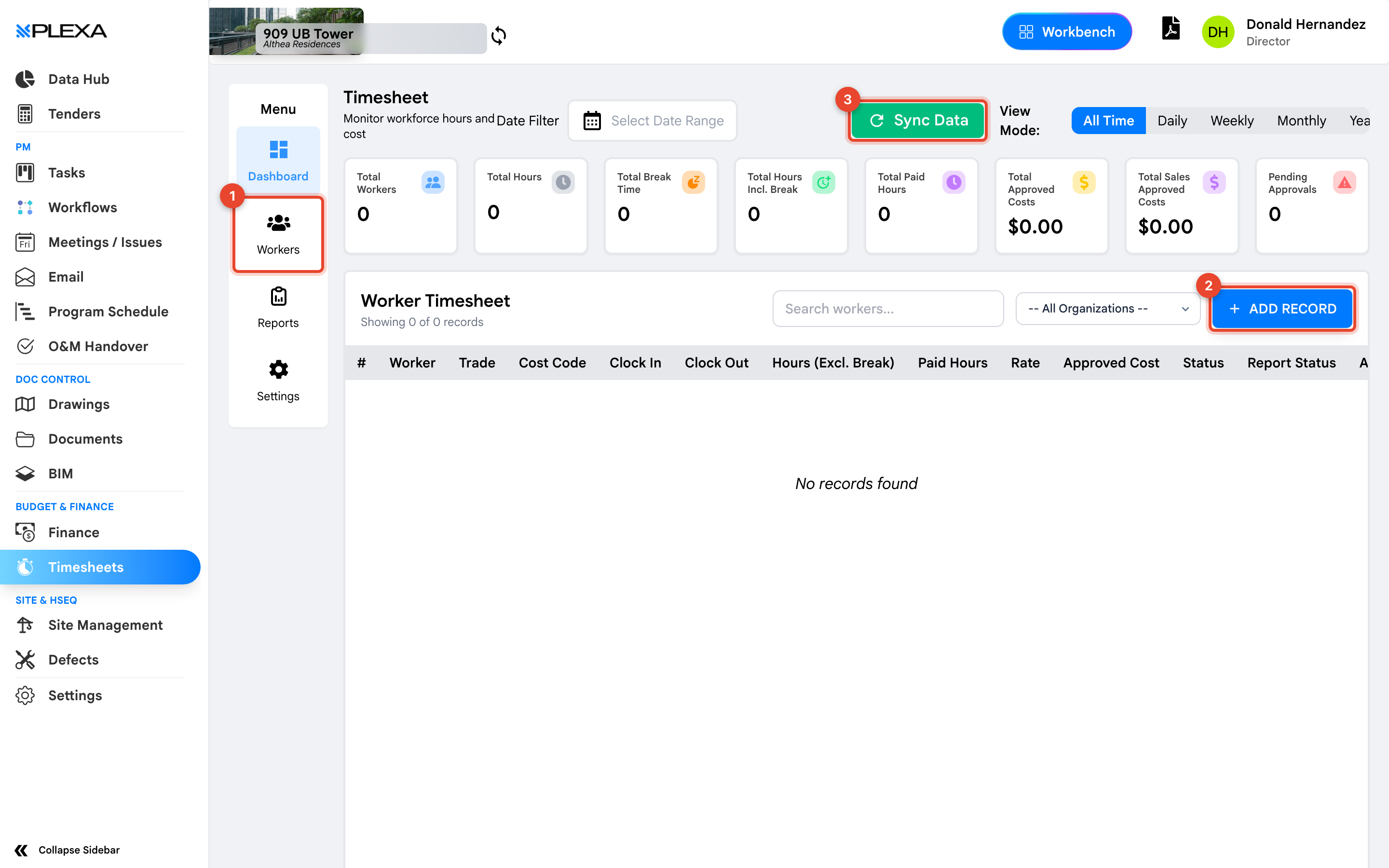
1 "Workers" · 2 "Add Record" · 3 "Sync Data"
Reading the Dashboard
The tiles across the top give the project's labour position at a glance: "Total Workers", "Total Hours", "Total Break Time", "Total Hours Incl. Break", "Total Paid Hours", "Total Approved Costs", "Total Sales Approved Costs" and "Pending Approvals".
"Pending Approvals" is the one to watch — hours sitting unapproved are costs the project has incurred but not yet recognised.
The Worker Timesheet
Each row records the worker, their "Trade", the "Cost Code", "Clock In" and "Clock Out", "Hours (Excl. Break)", "Paid Hours", "Rate", "Approved Cost" and a status.
Select "Add Record" to enter time by hand. Filter by organisation to see one subcontractor's hours rather than the whole project.
Hours excluding break and paid hours are different numbers. Check which one a report is using before reconciling against an invoice.
Notes & Recommendations
- "Sync Data" pulls in records captured elsewhere, such as site sign-in — run it before reviewing a week
- Time is recorded against a cost code. An uncoded record still counts hours but will not land in the right cost line
- Rates and cost codes come from "Settings" and are usually managed by one person on the project
Need More Support?
For Individual requests related to using Plexa Tools, Contact PLEXA SUPPORT
Email: support@plexapro.com
Phone: 1300 117 140
We're here to help you get the most out of Plexa.