Personnel
The personnel register lists everyone who can work on the project and shows, at a glance, whether each person is actually cleared to. It is the register most people open daily, and the one that stops work when it is out of date.
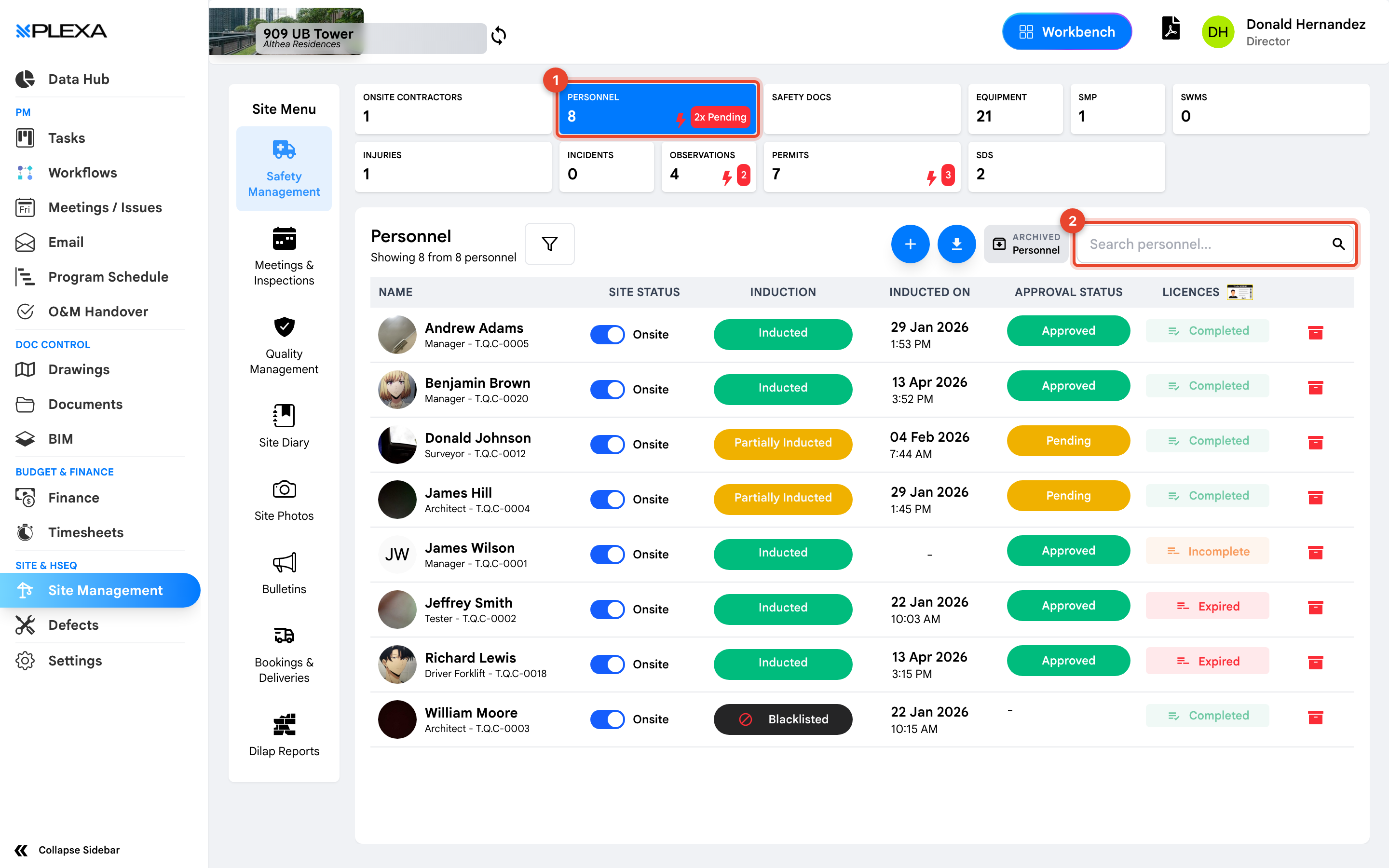
1 The "Personnel" tile · 2 "Search personnel"
Reading the Columns
Each row carries a worker, their trade and personnel ID, then the columns that matter:
- Site Status — whether they are currently on site
- Induction — Inducted, Partially Inducted, or Blacklisted
- Inducted On — the date and time induction completed
- Approval Status — Approved or Pending
- Licences — Completed, Incomplete or Expired
Three columns decide whether someone can work: Induction, Approval Status and Licences. A person can be on site, approved, and still blocked by an expired licence.
The States That Stop Work
Partially Inducted means the induction was started but not finished — commonly a missing document. Pending approval means nobody has signed the person off yet. Expired under Licences means a ticket has run out.
Blacklisted is different. It is a deliberate bar on that person working on the project, and the record stays visible rather than being deleted, so the history is kept.
Finding People
Use "Search personnel" for a name. "Archived Personnel" holds people no longer active on the project — check there before adding someone again, because a returning worker usually already has a record with their induction history attached.
Notes & Recommendations
- Scan for Expired licences before a shift rather than after. It is the most common reason someone is turned away at the gate
- The register also records Apprentice status and Aboriginal and/or Torres Strait Islander identification, where the project reports on them
- Personnel belong to a company. If someone is missing, check "Onsite Contractors" — their employer may not be set up yet
Need More Support?
For Individual requests related to using Plexa Tools, Contact PLEXA SUPPORT
Email: support@plexapro.com
Phone: 1300 117 140
We're here to help you get the most out of Plexa.